Snapchat Ad Rejections 2026 — Top 5 Causes, Safe Zone Specs & How to Fix Them
Snapchat rejects ads for safe zone violations more than any other reason. Get the exact pixel specs, a free 10-point audit checklist, and fixes for the 5 most common Snapchat ad rejections in 2026.
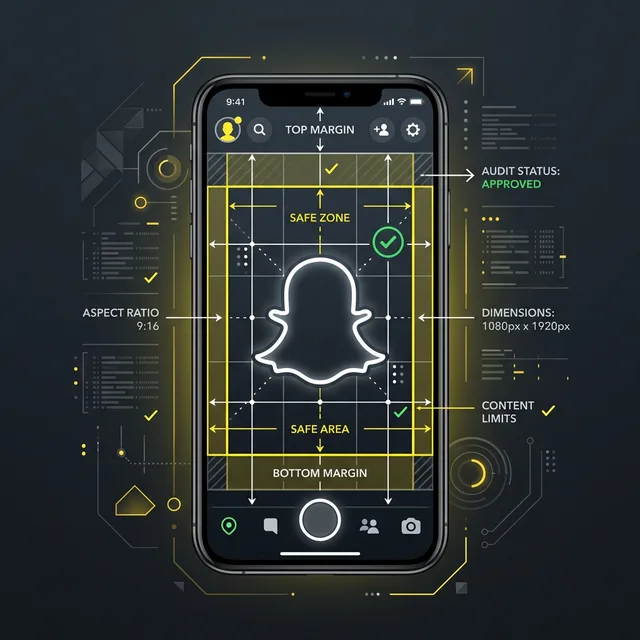
Snapchat rejects ads for safe zone violations more than any other reason in 2026. Compliant creative requires text within the platform safe zone away from UI overlays, audio-aware ad copy, and creative-format alignment with Story, Spotlight, or Discover specifications. Safe zone audit prevents the majority of rejections.
Why Your Snapchat Ads Need a Compliance Audit
Snapchat remains one of the most underutilized and under-audited advertising platforms. With over 800 million monthly active users in 2026 and a demographic skew toward Gen Z and young Millennials, Snapchat offers unique access to audiences that are increasingly hard to reach on Meta and TikTok. However, this opportunity comes with a distinct set of compliance challenges that most advertisers are unprepared for.
Snapchat ad rejections are common for first-time advertisers, and many practitioners report higher early rejection rates on Snapchat than on Meta or TikTok. The primary reason is that advertisers typically repurpose creative assets designed for other platforms without adapting them to Snapchat's unique format requirements, content policies, and creative safe zones.
A Snapchat-specific ad audit addresses three critical risk areas:
- Creative Technical Compliance: Snapchat's full-screen vertical format (1080×1920) means that standard platform UI elements (username, CTA buttons, swipe-up prompts) overlay significant portions of the screen. If your key messaging, disclaimers, or brand elements fall within these overlay zones, they become invisible to the user—which can trigger both a policy violation and a wasted impression.
- Content Policy Alignment: Snapchat's content policies differ from Meta and TikTok in several important ways, particularly regarding age-gated content, political advertising, and health claims. An ad that runs smoothly on Meta may be instantly rejected on Snapchat. For a detailed breakdown of Snapchat's rules, see our Snapchat advertising guide.
- Regulatory Overlay: For brands operating in regulated industries (health, finance, alcohol, gambling), Snapchat applies additional compliance layers that are stricter than what many advertisers expect from a "younger" platform.
Understanding Snapchat's Advertising Policies (2026 Update)
Snapchat's advertising policies were significantly updated in January 2026 to align with global regulatory trends and address emerging ad formats (AR Lenses, Spotlight Ads, Dynamic Product Ads). Here are the key policy areas that every advertiser must understand:
Prohibited Content Categories
Snapchat maintains a strict list of content categories that cannot be advertised under any circumstances:
- Tobacco products, e-cigarettes, and vaping devices (the strictest policy among major platforms)
- Illegal drugs and drug paraphernalia
- Weapons, ammunition, and explosives
- Counterfeit goods and unauthorized replicas
- Predatory financial products (payday loans, high-interest lending)
- Misleading or deceptive content, including deepfakes and manipulated media
Restricted Content Categories
These categories are allowed but require additional compliance measures:
- Alcohol: Permitted only in markets where legal. Requires age-gating (21+ in the US, 18+ in the EU). Creative must not depict excessive consumption or target minors.
- Gambling & Betting: Requires valid gambling license in the target jurisdiction. Must include responsible gambling messaging and self-exclusion information.
- Health & Pharmaceuticals: Prescription drug advertising is allowed only in the US and New Zealand. All health claims must be substantiated. "Cure" and "treat" language is prohibited for non-pharmaceutical products.
- Financial Services: Must include appropriate risk disclosures. Crypto advertising is subject to regional restrictions (banned in the UK without FCA approval, restricted in the EU under MiCA).
- Political Advertising: Snapchat banned all political and issue-based advertising in 2024 and this ban remains in effect in 2026. This includes ads that mention candidates, parties, legislation, or social issues, even indirectly.
Content Quality Standards
Beyond prohibited and restricted categories, Snapchat enforces content quality standards that are often the hidden cause of ad rejections:
- Audio Requirements: All video ads must include audio. Silent videos with text-only content are rejected as "Low-Quality Creative."
- Resolution Standards: Minimum 1080×1920 resolution for full-screen creatives. Upscaled or pixelated content is rejected.
- Text Legibility: All on-screen text must meet minimum font size requirements (equivalent to 36pt at 1080px width) and have sufficient contrast against the background.
- Branding: The advertiser's brand name or logo must be clearly visible within the first 2 seconds of a video ad or at all times in a static ad.
Snapchat Creative Safe Zones: Technical Specifications
The creative safe zone is arguably the most critical technical concept for Snapchat advertising. Unlike Meta or Google, where ads appear in a feed environment with dedicated space for your creative, Snapchat ads occupy the full screen—but significant portions of that screen are covered by persistent UI elements.
If your key messaging, disclaimer text, or brand elements fall within the UI overlay areas, they are hidden from the user. This not only wastes your ad spend on invisible content but can also constitute a compliance violation if mandatory disclosures are obscured.
The Safe Zone Grid (1080×1920)
Here are the exact pixel specifications for Snapchat's safe zones in 2026:
| Zone | Position | Pixels Reserved | What's Overlaid |
|---|---|---|---|
| Top Safe Zone | Top of screen | 0 to 210px from top | Username, profile icon, close button, story navigation |
| Bottom Safe Zone | Bottom of screen | 1720 to 1920px from top | CTA button ("Swipe Up", "Shop Now"), attachment bar |
| Left Safe Zone | Left edge | 0 to 60px from left | Navigation gestures, system UI |
| Right Safe Zone | Right edge | 1020 to 1080px from left | Share, mute, and overflow menus |
The Effective Creative Area is therefore 960×1510 pixels (from position 60,210 to 1020,1720). All critical content—headlines, key selling points, disclaimers, brand elements, and human faces—must fall within this area.
Safe Zone Rules by Ad Format
- Single Image/Video Ads: All critical content within the 960×1510 effective area. CTA text must not duplicate the platform-rendered CTA button.
- Collection Ads: The top product tile must account for the bottom overlay where the product carousel renders. Keep headlines in the top-center of the effective area.
- Story Ads: Each story card has its own safe zone. The "More" button overlay at the bottom occupies an additional 50px compared to single ads.
- AR Lens Ads: The camera UI occupies the bottom 300px. All interactive elements must be placed in the center 60% of the screen.
- Dynamic Product Ads: Template-generated content must be configured to respect safe zones automatically. Override default templates if product images or text extend into overlay areas.
Common Safe Zone Mistakes
Even experienced advertisers make these errors:
- Placing disclaimers in the bottom 200px: Legal text, "Terms apply," or risk warnings become invisible under the CTA button. This is both a compliance violation and a wasted legal safeguard.
- Centering headlines vertically: On a 1920px canvas, the true vertical center is 960px—which falls within the safe zone. However, many designers center text at the visual center of the original canvas, which may push text into the bottom overlay zone after UI rendering.
- Face-cropping at screen edges: Placing spokesperson or UGC creator faces near the top of frame causes them to be partially obscured by the username/profile overlay, making the ad feel unprofessional and reducing engagement.
The Free Snapchat Ads Audit Checklist
Use this 10-point checklist to audit every Snapchat ad before submission. Each item addresses a common cause of rejection or underperformance:
| # | Audit Item | Pass/Fail Criteria |
|---|---|---|
| 1 | Creative Resolution | Minimum 1080×1920, no upscaling artifacts |
| 2 | Safe Zone Compliance | All critical content within 960×1510 effective area |
| 3 | Audio Presence | Video ads include audio track (no silent videos) |
| 4 | Brand Visibility | Brand name/logo visible within first 2 seconds |
| 5 | Text Legibility | Minimum 36pt equivalent, sufficient contrast ratio |
| 6 | CTA Consistency | Custom CTA text doesn't conflict with platform CTA button |
| 7 | Disclaimer Visibility | Required disclosures visible within safe zone for min. 5 seconds |
| 8 | Age-Gate Compliance | Restricted products have proper age verification configured |
| 9 | Landing Page Match | Destination URL content consistent with ad creative messaging |
| 10 | Prohibited Content Check | No prohibited categories, substances, or deceptive claims |
Pro Tip: Create a Snapchat-specific safe zone template overlay in your design tool (Figma, Photoshop, Canva). Add semi-transparent red zones marking the top 210px, bottom 200px, and 60px side margins. This visual guide makes it instantly obvious when content strays outside the safe area during the design phase.
Common Snapchat Ad Rejections and How to Fix Them
Based on the rejection patterns advertisers most commonly report, these are the top 5 reasons for rejection and their solutions:
1. "Low-Quality Creative"
Cause: Silent video, low resolution, or content that appears unprofessional (blurry images, unfinished graphics).
Fix: Always include audio. Use 1080×1920 native resolution. Ensure all graphics are production-quality. Avoid repurposing Instagram Story screenshots—recreate natively for Snapchat.
2. "Misleading or Deceptive Content"
Cause: Exaggerated claims, fake UIElements (e.g., fake "Play" buttons), fake notifications, or countdown timers suggesting false urgency.
Fix: Remove all fake interactive elements. Substantiate all claims. Replace absolute guarantees with qualified language ("up to," "may help"). Avoid dark patterns entirely.
3. "Restricted Product Non-Compliance"
Cause: Alcohol, gambling, or health product ads missing required age-gating, disclaimers, or licensing information.
Fix: Configure proper audience targeting restrictions in Snap Ads Manager. Include all required disclaimers within the safe zone. Provide licensing documentation during ad submission.
4. "Editorial Standards"
Cause: Excessive capitalization (ALL CAPS headlines), clickbait language, sensationalist claims, or content that appears "spammy."
Fix: Use title case or sentence case. Write headlines that accurately represent the content. Avoid superlatives without substantiation. A conversational, authentic tone performs best on Snapchat.
5. "Brand Identity Issue"
Cause: No visible brand name or logo, or the brand identity doesn't match the registered advertiser account.
Fix: Include brand name/logo in the creative, visible within the first 2 seconds. Ensure the brand name in the ad matches the business name registered in your Snap Ads Manager account.
Snapchat vs. Meta vs. TikTok: Policy Comparison for Advertisers
Understanding the policy differences between the three major short-form/visual platforms helps you efficiently adapt your compliance strategy across channels:
| Policy Area | Snapchat | Meta | TikTok |
|---|---|---|---|
| Political Ads | Completely banned | Allowed with disclaimers | Banned |
| Tobacco/Vaping | Completely banned | Banned | Banned |
| Crypto Advertising | Restricted (jurisdictional) | Restricted (pre-approval) | Restricted (jurisdictional) |
| Health Claims | Strict substantiation | Multimodal NLP review | HMC + visual disclaimer |
| Safe Zone Impact | Critical (full-screen format) | Moderate (feed format) | High (full-screen format) |
| Audio Requirements | Required for video ads | Optional but recommended | Strongly recommended |
| Age-Gating | Built into ad manager | Self-declared targeting | Self-declared targeting |
| Before/After Imagery | Restricted for health | Broadly restricted | Broadly restricted |
Key Takeaway: Snapchat's unique policy differentiators are its complete ban on political advertising, its mandatory audio requirement for video ads, and its critical safe zone compliance due to the full-screen format. Advertisers who simply repurpose Meta or TikTok creatives for Snapchat without addressing these differences will face significantly higher rejection rates. For detailed policy breakdowns of the other platforms, see our Meta ad policy guide and TikTok community guidelines guide.
Automate Your Snapchat Ad Audit
Manually auditing every Snapchat ad against the 10-point checklist, safe zone specifications, and platform policies is effective but time-consuming—especially for brands running multiple campaigns with dynamic product ads that generate hundreds of creative variations automatically.
The AI-Powered Alternative: Modern compliance tools can automate the entire Snapchat audit process by analyzing your ad creative, copy, and landing pages against Snapchat's current policies in real time. This includes:
- Visual Safe Zone Analysis: Automatic detection of text, disclaimers, and brand elements that fall outside the effective creative area.
- Claim Verification: NLP scanning of all ad copy for prohibited claims, unsubstantiated language, and policy trigger words.
- Regulatory Overlay: Cross-referencing your ad against the specific regulations of every target market (FTC, DSA, FCA, etc.).
- Format Compliance: Automatic verification of resolution, aspect ratio, audio presence, and branding visibility requirements.
Get Started: AuditSocials' compliance engine supports full Snapchat ad auditing—from safe zone analysis to policy compliance scanning. Upload your creative assets, select your target markets, and receive a comprehensive compliance report with specific, actionable recommendations for every flagged issue. Check our Policy Tracker to identify your highest-priority risks.
Related Compliance Articles
Don't miss the next policy change.
Create a free account — track every policy change across 8 platforms, get instant alerts, and access every free compliance tool. Or try our Snapchat Ads Audit first.
Report Keywords — Run AI Compliance Audit
Related Posts
Cross-Platform Social Commerce Checkout Ads Compliance 2026 — Meta Shops, TikTok Shop, Pinterest & Shoppable Ad Rules
Social commerce checkout ads across Meta, TikTok, and Pinterest face tightening consumer protection, pricing transparency, and product claim rules in 2026. Here's the cross-platform compliance guide.
Social Media Content Audit 2026 — Free AI-Powered Checklist & Framework
Most brands audit content manually — and miss a large share of violations. This 7-step AI-powered framework automates compliance checks across Meta, TikTok, and Snapchat. Free downloadable checklist included.
Snapchat's 2026 Full-Funnel Ad Strategy: AI Creative Optimization, Smart Campaigns & Total Snap Takeovers
Snapchat's 2026 NewFronts reveal a full-funnel AI strategy — Smart Ads, Smart Budgets, Total Snap Takeovers, and new Offers beta — redefining performance advertising on the platform.